
Set up your venue: first run
Dieser Inhalt ist noch nicht in deiner Sprache verfügbar.
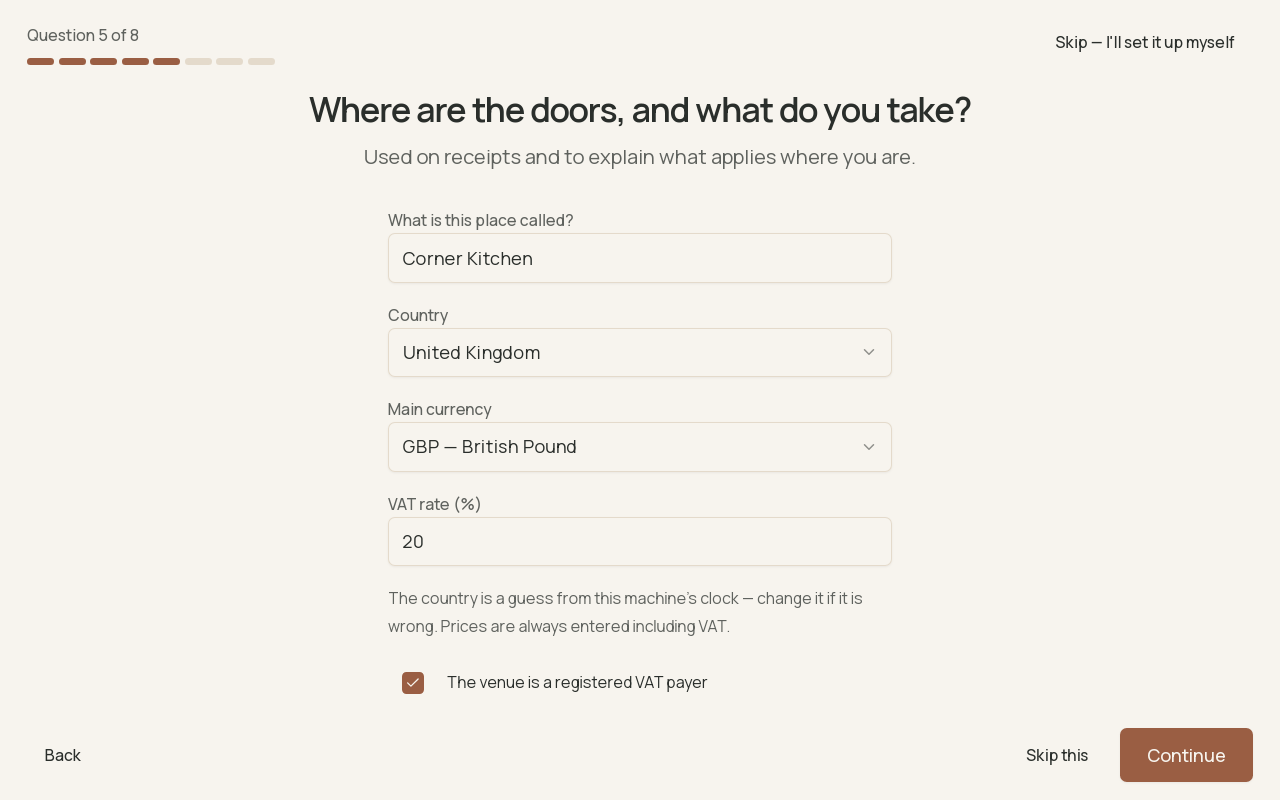
The venue's name, country, currency and VAT rate, reviewed before the first sale.
First run is the set of eight short questions Brindola asks the first time it opens on the device that will run your venue. The answers turn on what your place uses (tables, a kitchen screen, a receipt printer) and create the owner’s account. Every answer can be changed later in Settings, and it needs no internet, account or card.
- Choose the language
- Answer eight questions
- Check the summary
- Start trading
- Sign in
Before you start
Section titled “Before you start”| Have ready | Asked in |
|---|---|
| The venue’s name | Question 5 |
| Its country, currency and VAT rate | Question 5 |
| Opening hours, if you want reports to know them | Question 6 |
| A receipt printer plugged in and switched on, if you use one | Question 7 |
| The owner’s name and a PIN of at least 4 digits | Question 8 |
Run first run on the main device: the computer that will hold the venue, on a cable and on power. A second terminal or a kitchen screen does not run first run. It joins this venue instead: see Pair a device.
The welcome screen
Section titled “The welcome screen”The welcome screen says Let’s set this venue up.
- Language: the button in the middle chooses the language of the screens, from 23.
- Start begins the questions.
- Join a venue that is already set up is for a device joining a venue that another device already runs. Do not use it on the main device.
- Connect to a backoffice is for a venue whose catalog and staff come from a backoffice (Enterprise). Use it only with the address and pairing code you were given.
- Skip — I’ll set it up myself closes the questions and opens an empty venue. ⚠ It throws away the answers given so far, at any question.
The questions
Section titled “The questions”Each question shows Question N of 8. Back returns to the last one, and some can be skipped with Skip this.
- What does this place do? A restaurant, A café or bar, A shop, or Something else — I’ll set it up myself. It only pre-fills the next answers, which you confirm one by one. Something else does not skip anything; it just leaves them empty.
- How do guests get their food? Tick everything you do: They eat here, They take it away, We deliver it ourselves. Orders from delivery platforms do not depend on this.
- Do you seat guests at tables? Asked only if guests eat here. Yes, we have tables turns on the floor plan, which you draw later. No, it’s counter service names each check instead.
- Is there a kitchen that needs tickets? Yes creates one kitchen station, called Kitchen unless you rename it, and turns on the kitchen screen. More stations come later: see Set up a kitchen screen.
- Where are the doors, and what do you take? The venue’s name, Country, Main currency, VAT rate (%) and whether the venue is a registered VAT payer. The country is guessed from the computer’s clock: check it. Prices are always entered including VAT.
- When are you open? The same hours every day, Weekdays and weekends differ, or Set it later. Reports use these hours; with none, they say the hours are not recorded.
- Shall we use a printer for receipts? Brindola lists the printers plugged into this computer. Choose one to print receipts. A network printer is added afterwards: see Set up printers.
- Who runs this venue? The owner’s Name, then a PIN of at least 4 digits, typed twice. This question cannot be skipped.
The summary
Section titled “The summary”That’s it — here’s what changed lists what each answer turned on and the Settings page where it lives, then Before your first order. Select Start trading.
The sign-in screen asks Who is working?. Tap the owner, type the PIN and select Log in.
Change an answer later
Section titled “Change an answer later”| Answer | Where |
|---|---|
| How guests get their food | Settings → Orders |
| Tables | Settings → Floor |
| Kitchen | Settings → Hardware → Stations |
| Name, VAT rate, VAT payer | Settings → Identity |
| Country and currency | Settings → Identity, under Country, currency and time zone |
| Opening hours, and when a new business day starts | Settings → Hours |
| Receipt printer | Settings → Printing → Printers |
| The owner and other staff | Settings → Staff |
| The screens’ language on this device | Settings → Preferences |
Changing the currency does not convert prices. Set country and currency before you build the catalog.
The trial
Section titled “The trial”The first 14 days run the Plus plan with everything on, and start when first run finishes. In the last three days a banner counts down. When the trial ends without a licence, new orders close; history, reports, backups and export keep working, and the open trading day may finish. Settings → Licence shows the plan and the days left. A licence file can also be installed without internet.
Questions
Section titled “Questions”Can I run first run again?
Section titled “Can I run first run again?”Not from the start screen once it is finished. Settings → This database → Reset venue setup opens it again, keeping the licence and the trial’s original dates.
Can I practise before going live?
Section titled “Can I practise before going live?”Yes. Training mode, under Settings → Staff, gives a terminal a practice copy of the venue that never touches the real records. Owners and managers start it after signing in.
Does first run need the internet?
Section titled “Does first run need the internet?”No. Only connecting a backoffice and buying a licence online need it.
I pressed “Skip — I’ll set it up myself” by mistake. What now?
Section titled “I pressed “Skip — I’ll set it up myself” by mistake. What now?”Nothing was saved from the questions. Set the venue up in Settings; until the first order, the order screen offers Set this venue up in a couple of minutes. Or use Reset venue setup to see the questions again.
Which computers can run Brindola?
Section titled “Which computers can run Brindola?”Windows and Linux. The main device should be a desktop or mini PC, not a tablet carried around the room.