
All your delivery platforms on one screen
Handle orders from multiple platforms on one terminal. Manage your catalog, prices and stock in one place and sync changes to your connected listings. One interface for your team, without a separate device for every platform.
Online orders
New
#10422 items
Sample order
1 × Vegetable burger
Options & extras
- Extra cheese
- No onions
1 × Fries
Pack the sauces separately.
#10432 items
Sample order
1 × Vegetable burger
1 × Fries
In progress
Ready
Catalog sync
Catalog
Prices
Stock & availability
Changes reach each listing through its supported integration.
One order inbox
Accept, prepare and hand over orders from the same screen.
Catalog and prices together
Publish your catalog and manage platform prices from your terminal.
Stock and availability in sync
Update stock for stores and sold-out availability for restaurants.
Trinidad and Tobago
Not available in Trinidad and Tobago yet
Our order bridge connects to delivery platforms, and a platform is named on this page the day it is live in your region, not before. Until then, every delivery order you take by phone or at the counter runs through the same queue described below.
How a platform order runs through Brindola
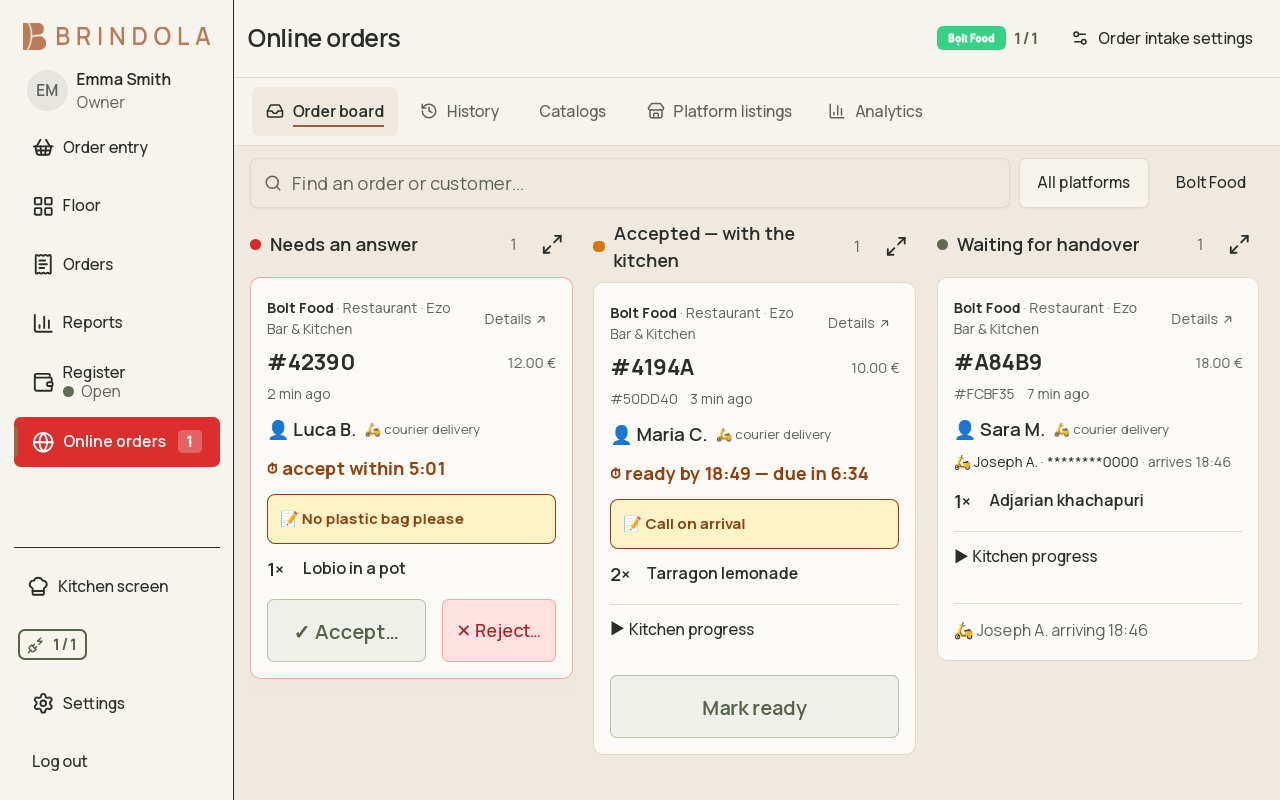
One queue for the room, the phone and every platform. The platform's own deadline counts down on screen so nothing is lost to a missed tablet.

The order arrives
The platform sends the order to our bridge, which turns it into a Brindola order with the platform's reference and drops it into the inbox on the main terminal and the kitchen screen. The platform's accept deadline counts down in view.
Accept with a prep time
One tap accepts the order and tells the platform when it will be ready; one tap rejects it with a reason if the kitchen cannot take it. The items land on the kitchen screen in the order they were paid.
Cook, bump, bag
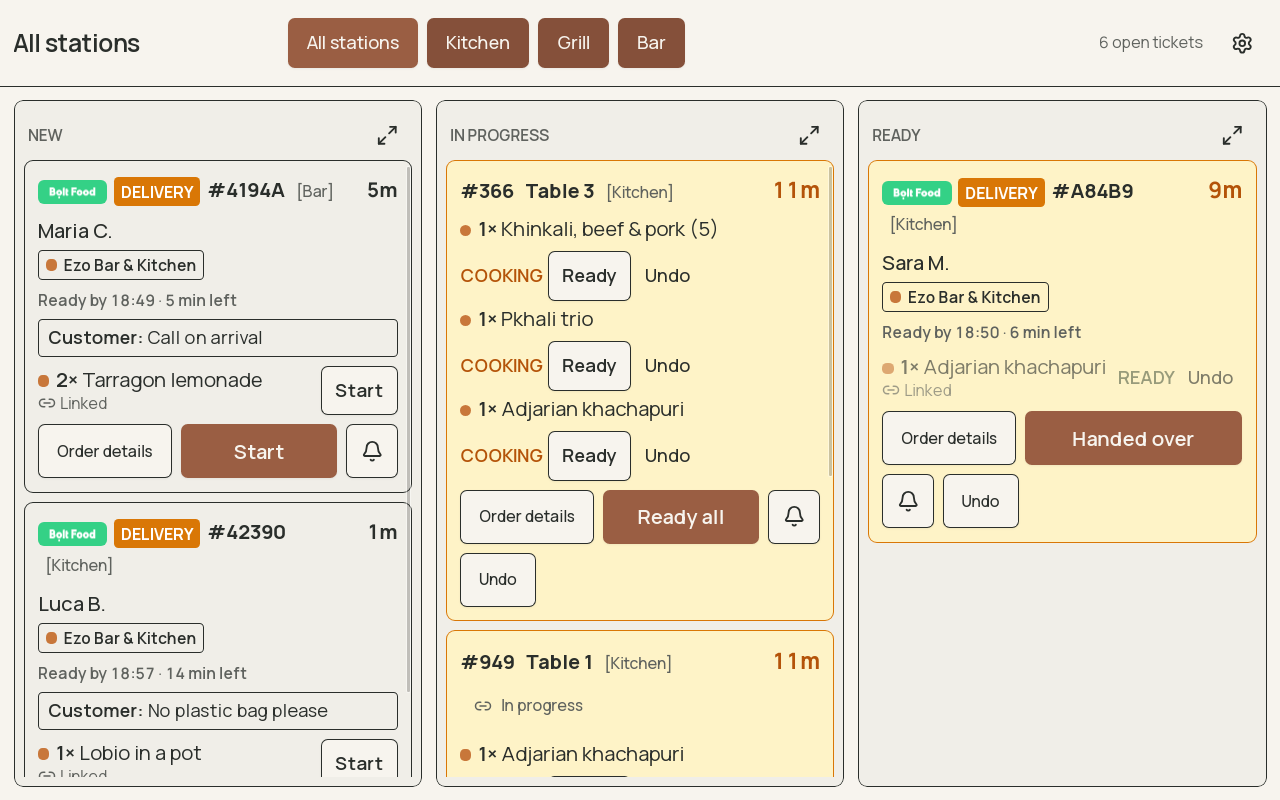
The kitchen works the ticket like any other. Bumping it prints a bag slip with the platform's order number and marks the order ready, so the platform calls the courier and nobody shouts across the pass.
It is in the close
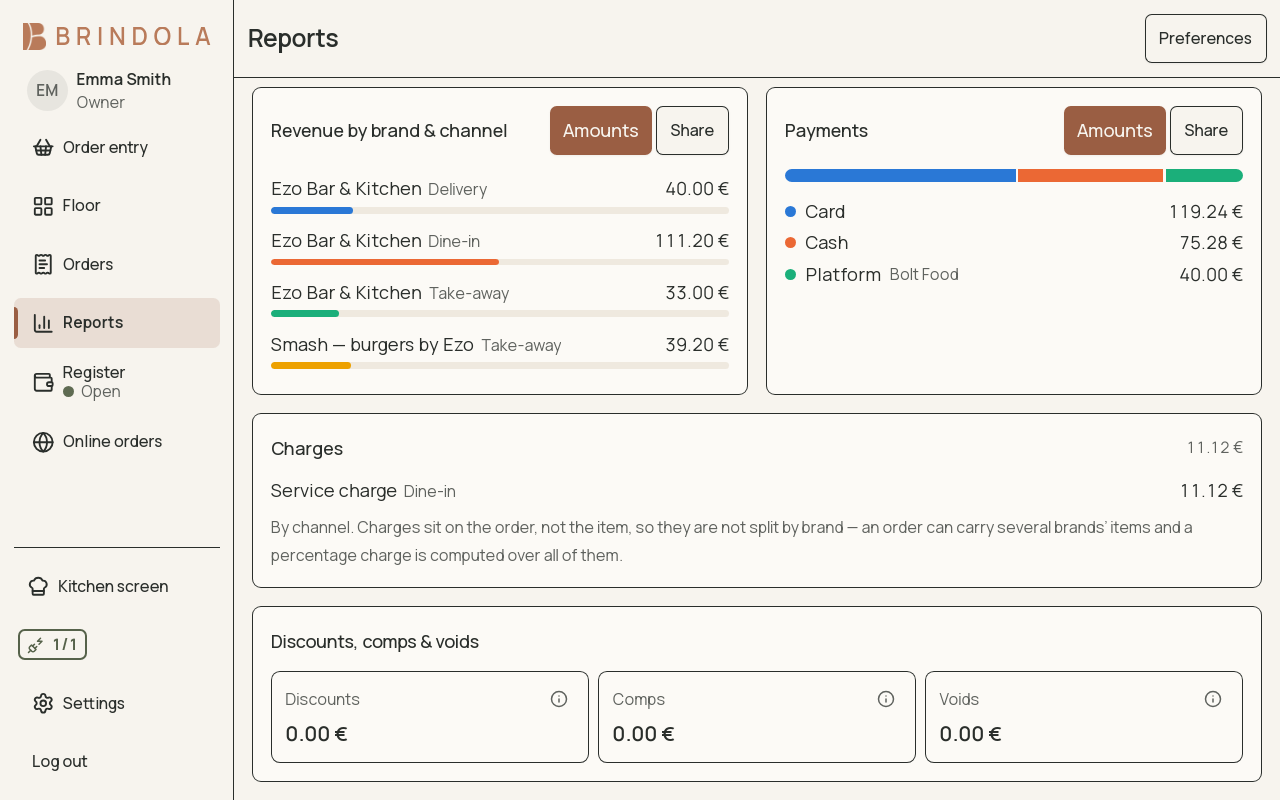
The order is booked to the platform as its own channel, with the platform's payout as the tender, and the day's report shows revenue by platform and by brand without a spreadsheet.
What the integration gives you
Several brands from one kitchen on one screen
A platform listing per brand, all of them arriving on the same kitchen screen and reported apart. Three virtual brands out of one kitchen is a setting on the same terminal.
Your menu, published from the terminal
Menu, prices, opening hours and what has sold out go out to the platform from the same screen your floor uses. The dish that ran out at eight disappears from the app at eight.
The line drops, the kitchen keeps cooking
Orders already accepted stay on the kitchen screen and in the close whatever the internet does. New platform orders wait at the bridge and arrive when the line is back, with their deadlines intact.
The order data stays with you
Every ticket, address and time lives on the main device in your venue. Only the aggregate close leaves, and only to a backoffice you connect.
Cancellations caught as they happen
A cancellation from the platform voids the order on the terminal and the kitchen screen with its reason recorded, so the close never counts a meal nobody paid for.
Courier and customer details where the pass sees them
The courier's name and arrival, the customer's name and the pickup code sit on the ticket and the bag slip, so the right bag goes out of the door with the right rider.
Other regions
Our order bridge speaks to platforms across Europe, and more are being added. A platform appears beside a region only where it is live and connected through our bridge; each region's page says the same thing in its own language.
Your region, Trinidad and Tobago, is at the top of this page.
| Region | Delivery platforms |
|---|---|
| ΚύπροςCyprus |
|
| EestiEstonia |
|
| საქართველოGeorgia |
|
| LëtzebuergLuxembourg |
|
| Malta |
|
| الإمارات العربية المتحدةUnited Arab Emirates |
|
| United Kingdom |
|
In the other 120 regions no platform is connected yet; each region's page says when that changes.
Metered, never a share of your sales
Delivery intake is an add-on to any plan, counted per order your terminal accepts, per active venue, or both, as the pricing table for your region shows. An order you reject is never counted. There is never a revenue share or a cut of the platform order.
Questions about delivery orders
Do I still need the platform's tablet?
No. Once a platform is connected through our bridge, its orders arrive on the terminal and the kitchen screen and are accepted from there. The tablet can go back in its box.
What happens if I do not accept an order in time?
The platform's own deadline counts down on the inbox and the kitchen screen, and the order is highlighted as it runs short. What a platform does when its deadline passes is the platform's rule, which is why the countdown is in view on every screen.
Can one kitchen run several brands on the same platform?
Yes. Each brand has its own listing and its own tab, orders carry the brand onto the ticket and the bag slip, and the close reports revenue by brand and by platform.
Does the platform order show up in my daily close?
Yes, as its own channel with the platform's total as the tender, so the drawer count and the platform payout reconcile separately and the day's revenue is complete.
What happens to delivery orders when the internet drops?
Orders already accepted are in the venue and stay on the kitchen screen. New ones wait at the bridge, which keeps talking to the platform on your behalf, and arrive the moment the line is back.
Which platforms can Brindola connect to in my region?
The ones named on this page, which are the platforms live in your region and connected through our bridge. A platform that is not named here is not integrated, whatever a brochure says, and is added the day it is.
Can I publish my menu to the platform from the terminal?
Yes. The listing's menu, prices, hours and sold-out items are edited on the terminal and pushed to the platform, so the app and the counter never disagree about what is on.
How is delivery intake charged?
As a metered add-on on top of any plan, per active venue, in your region's currency. A rejected order or one the platform withdraws is never counted. There is no share of your revenue.
See the delivery inbox with an order waiting
The product page walks through the inbox, the kitchen screen and the close with a platform order in them. Or start the free trial and connect a platform this week.