
Multi-brand and virtual kitchens
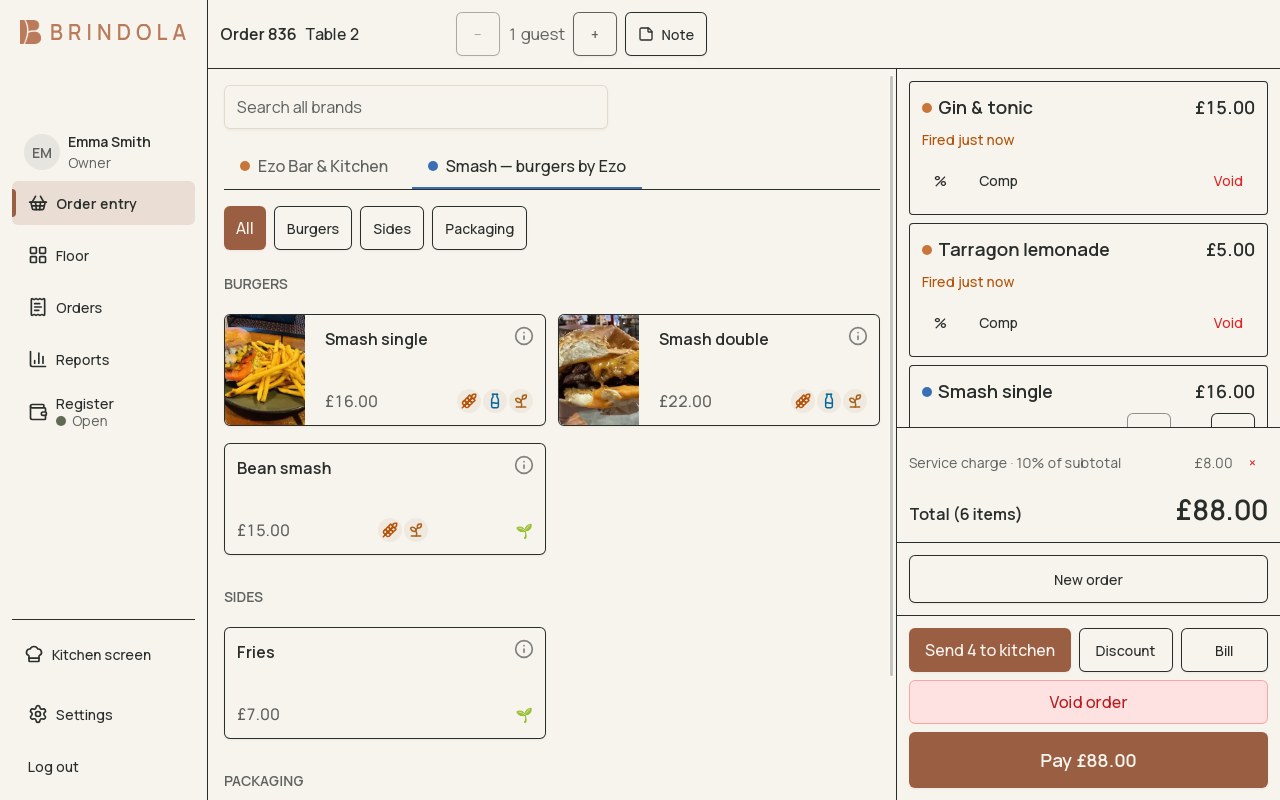
Two brands sharing the catalog, as tabs above the item tiles, beside an open bill.
A venue can sell several brands from the same kitchen or counter. Brand labels organise the offering and give reporting the context needed to separate their sales.
Organise the catalog
Section titled “Organise the catalog”Assign brands to the relevant products and check the order screen’s brand tabs and sections. Keep shared items intentional: staff should know where to find an item and which brand it represents.
Test a basket containing products from more than one brand. The brand follows each line, so the mixed basket does not need to pretend it belongs entirely to one brand.
Share preparation
Section titled “Share preparation”Brands can use the same stations. Route items by the preparation they need and check that tickets carry enough identity for the pass to package the correct order. A brand name does not create a separate physical kitchen.
Connect delivery menus
Section titled “Connect delivery menus”With the order intake add-on, review the mapping between each platform venue, its menu and the products in Brindola. Check the brand represented by the items before publishing.
Read brand results
Section titled “Read brand results”Full reporting can filter by brand and channel. Brand belongs to the item line; channel describes how the order arrived. Use both when comparing counter sales with platform sales from the same kitchen.
Changing a product’s brand affects future lines. Historical reporting keeps the brand recorded with the sale. A brand is also not a second venue: separate premises and their records need their own venue setup.