
Sync to your backoffice
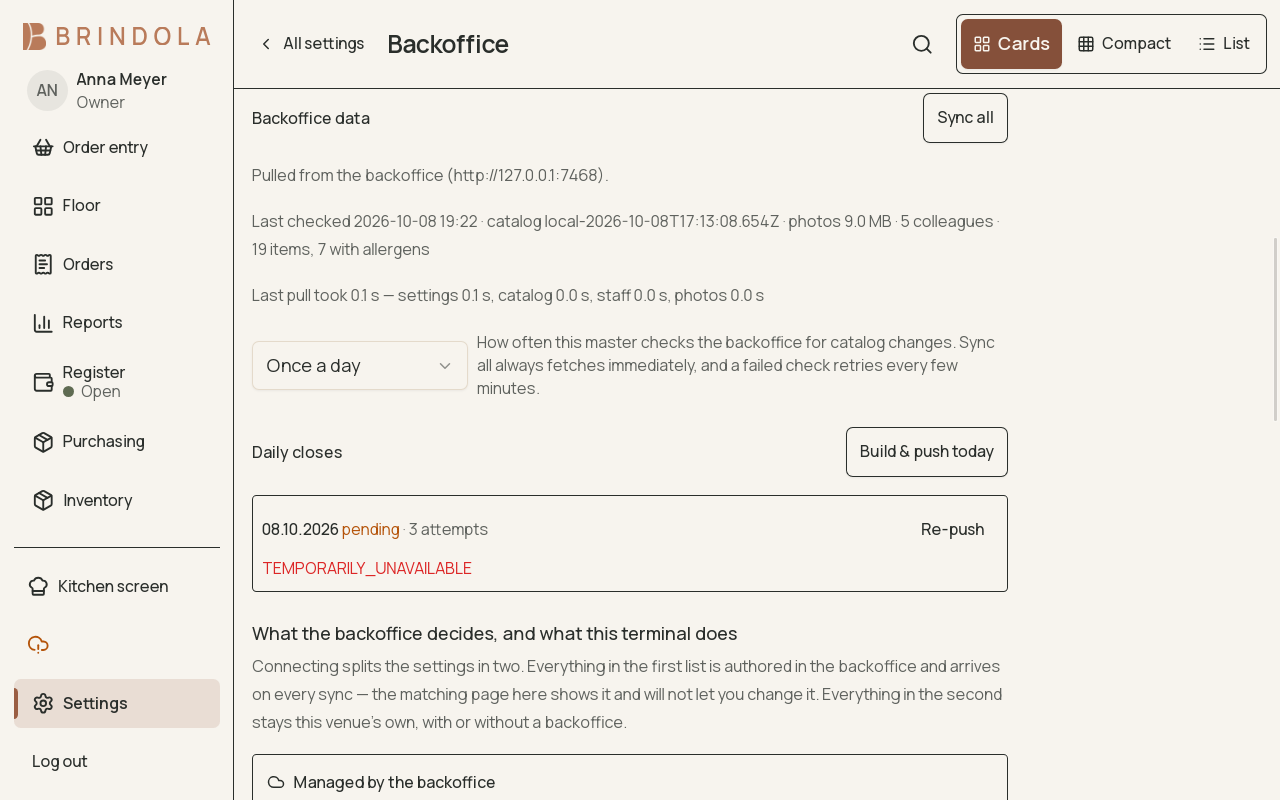
The last successful contact and any close waiting to send.
A backoffice connection supplies the venue with centrally managed information and receives aggregate closes. The venue continues to run its local orders even when the external connection is unavailable.
Connect the venue
Section titled “Connect the venue”Use the pairing details supplied for the organisation and venue. Confirm the location before accepting its identity, catalog, staff and hours. Review the resulting screens before service so staff know which facts are maintained centrally.
- Backoffice supplies venue and catalog
- Venue trades on its own devices
- Register closes locally
- Aggregate close reaches backoffice
Multiple locations and terminals
Section titled “Multiple locations and terminals”Connect each venue’s main device using the pairing details assigned to that installation. The other terminals join that main device through Devices; they do not each need a separate backoffice connection. Independent installations must keep separate close and stock records, even when they belong to the same business location.
When replacing a main device, restore the venue’s records and coordinate reconnection with the backoffice administrator. A new credential is not a new set of accounts. Keep the installation’s identity and history together; do not combine two independent installations by reusing a pairing code.
Purchasing currently manages local suppliers, orders and receipts. Pairing alone does not share those records or transfer control to the backoffice. Central approval and deliveries allocated across locations are planned as a separate, explicitly enabled connection.
Check status
Section titled “Check status”A configuration being saved means the connection is configured. Read the last successful contact, current error and pending work to decide whether it is working now. An unreachable server and refused credentials need different fixes.
Catalog and staff changes
Section titled “Catalog and staff changes”Edit centrally owned information in the backoffice, then allow the venue to receive the update. Check the changed item or account on the terminal. Repeatedly editing a locally displayed copy may be undone by the next central update.
Daily closes
Section titled “Daily closes”Close the register locally. A queued close waits for the connection and retries; it should not be submitted as a second close merely because the first is waiting. Confirm the successful result at both ends when reconciling the day.
Detailed orders remain in the venue. The aggregate close sent upstream is not an off-device copy of every record. Set up backups separately.
If sync is stuck
Section titled “If sync is stuck”Check the error, the last success and whether the destination can be reached. For a refusal, check the venue mapping and credentials with the backoffice administrator. Keep the business date and close identity with the support report.